Short answer: GitHub's own billing documentation states that prepaid credit/debit cards are not accepted as a valid form of payment for metered billing, and GitHub Copilot is billed through that same metered system. On cards we have issued ourselves, there is not a single successful GitHub charge. So we do not recommend trying to pay for Copilot with a prepaid virtual card like Pink Card — it will most likely be declined, and a decline still costs a failed-transaction fee. This guide covers what Copilot actually costs right now, what GitHub does accept, why a local card can still fail even when it is a real bank card, free ways to use Copilot, and two AI coding tools that do work on our cards: Cursor and Claude Code.
Written by the Pink Card team (pinkcard.cc). Payment-method rules are from the GitHub Docs article "Supported payment methods for GitHub" (docs.github.com/en/billing/reference/supported-payment-methods); pricing is from github.com/features/copilot/plans (the "For individuals" tab); both opened without signing in and captured on 2026-11-25 Beijing time — GitHub updates pricing and plans periodically, so check the live page for the current numbers. Pink Card is not affiliated with GitHub.
What Copilot costs right now (checked 2026-11-25)
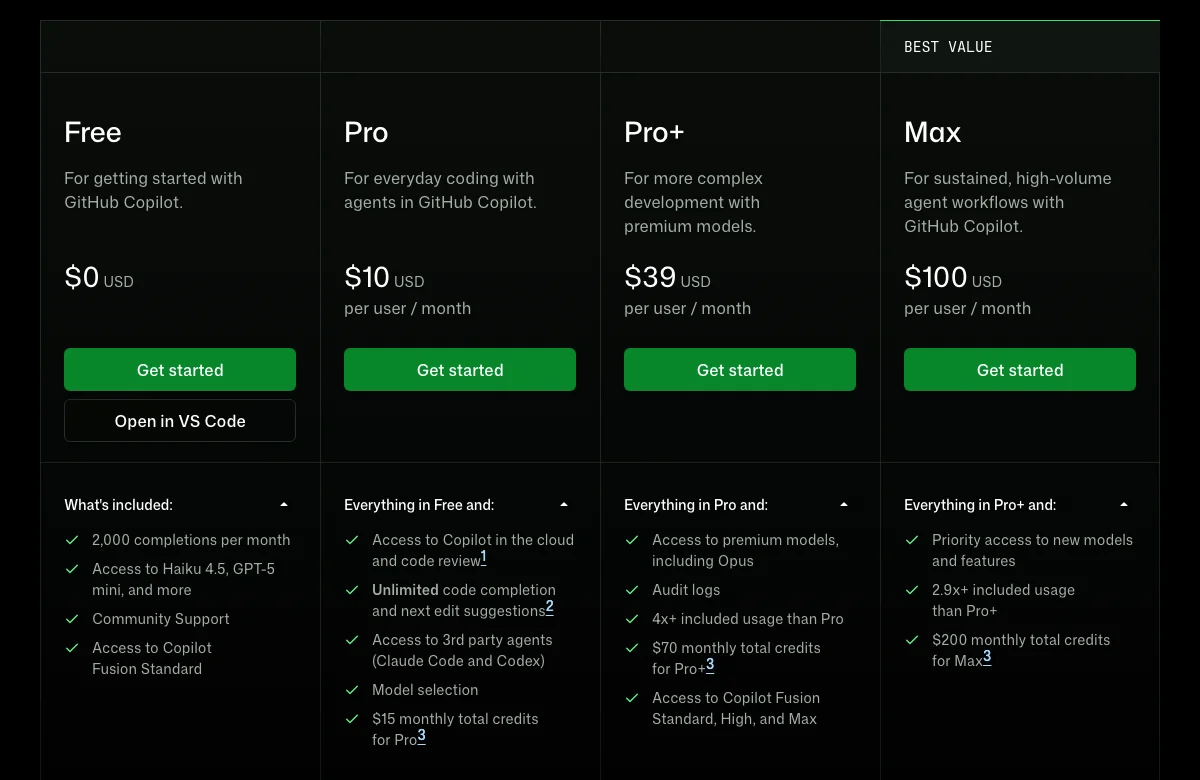
- Copilot Free: $0. Includes 2,000 code completions a month, access to a smaller set of models, and Copilot Fusion Standard.
- Copilot Pro: $10/month per user. Adds Copilot in the cloud and code review, unlimited code completion and next-edit suggestions, access to third-party agents (Claude Code and Codex), model selection, and $15 of monthly total credits.
- Copilot Pro+: $39/month per user. Adds premium models (including Opus), audit logs, 4x+ the included usage of Pro, $70 of monthly total credits, and Copilot Fusion Standard/High/Max.
- Copilot Max: $100/month per user — marked "Best value" on the individual pricing page. Adds priority access to new models and features, 2.9x+ the usage of Pro+, and $200 of monthly total credits.
- All four are billed to an individual account. Organizations buying seats for a team (Business/Enterprise-style licensing) go through an admin and volume pricing that is not shown on this page — ask your GitHub admin for the current rate rather than assuming an old number.
What GitHub actually accepts — and why prepaid cards are out
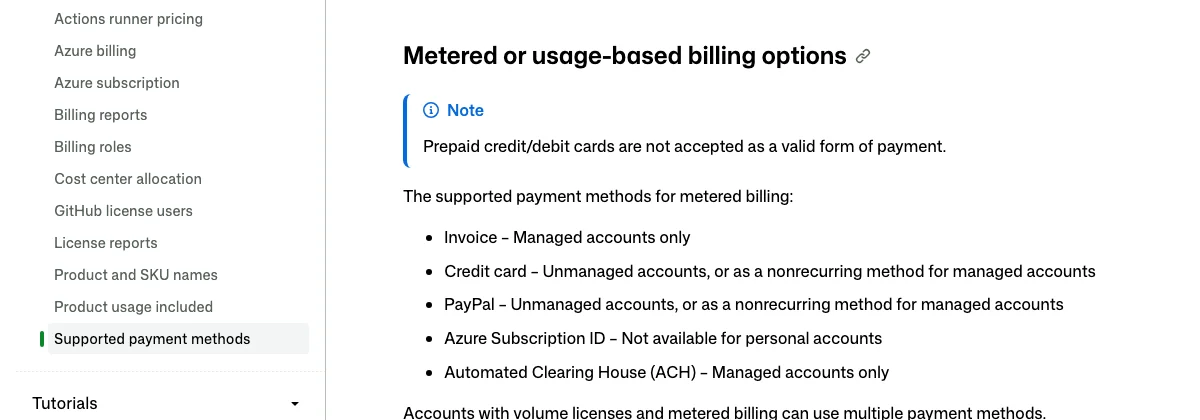
- GitHub Docs lists the supported payment methods for metered billing as: Invoice (managed accounts only), Credit card (unmanaged accounts, or as a one-off method for managed accounts), PayPal (unmanaged accounts, or as a one-off method for managed accounts), Azure Subscription ID (not available for personal accounts), and ACH (managed accounts only).
- Not accepted: prepaid credit/debit cards (including prepaid virtual cards), Alipay, WeChat Pay.
- Payment methods are added under your avatar → Settings → Billing and licensing → Payment information. A personal account pays with its own method; a Business account is paid by its organization admin.
Common reasons a card fails for Copilot
- Card type: prepaid cards (including prepaid virtual cards) are declined outright by GitHub's own rule — no network, address or balance change fixes this.
- Issuing country: mainland Chinese-issued dual-currency Visa/Mastercard cards are frequently declined at this step too, independent of balance or whether overseas transactions are enabled.
- Billing address mismatch: the address on file does not match the card issuer's or the card's country.
- Balance or limit: not enough for the listed price plus tax, or below the small verification hold used when adding the card.
- Repeated retries in a short window: submitting the same card again and again can trigger a temporary risk hold from the bank or GitHub.
Using Copilot for free or at no extra cost
- Start on Copilot Free — 2,000 completions a month is often enough for casual use before paying for anything.
- Verified students and teachers (GitHub Education) and maintainers of popular open-source projects can get Copilot Pro for free, no card required, once approved.
- If your employer or school already has GitHub, ask an admin to add you to the organization's Copilot seats — billing goes through the organization, not you.
- If you already have a working overseas bank card or a PayPal account in good standing, GitHub's checkout accepts those directly.
Want an AI coding tool instead? Try one that works on our cards
If what you actually want is an AI assistant for writing code, it does not have to be Copilot. Cursor (an editor with AI built in) and Claude Code (Anthropic's coding assistant, used by logging in with a Claude Pro/Max subscription) both charge through regular card checkouts — not GitHub's metered-billing system — and we have multiple successful charges on our own cards for both. How to subscribe and what to check if a payment is declined are covered in the two guides below.
Cursor plans and the order to check a declined card in: Cursor payment failed
Claude Code subscription vs API credits, and how to pay: Claude Code subscription payment, explained
Pink Card is the overseas gift card we make for AI subscriptions: a prepaid USD virtual card (Mastercard / Visa). It is not an official channel for GitHub, Cursor or Anthropic. Choose an amount on pinkcard.cc, pay, and the card number, expiry and CVV arrive by email about 1–2 minutes later. Card issuance: $10 one-time plus a 3% service fee on (card amount + $10); presets start at $50. A $1 fee applies per transaction, including declined ones (at most 3 per card per month) — which is exactly why we are telling you not to try this on GitHub: it is explicitly unsupported, so every attempt would just cost you failed-transaction fees. $2.50 monthly fee from the balance. Full fee table: pinkcard.cc/en/fees.
Buy a card: choose an amount on the Pink Card home page
See the steps for adding a prepaid card to other AI tools: How to use Pink Card with AI subscriptions
Chinese version (中文版,付款方式按中文站): GitHub Copilot 付款失败怎么办