Short answer: you do not have to take a provider's word, or a screenshot, for it. Find the operating company's legal name and registration number, look that number up on the regulator's public registry, and check three fields: the name, the registration status and the expiry date. If any of the three does not match, or the provider never tells you who the operating company is, treat that as a red flag.
Written by the Pink Card team. The FINTRAC lookup and screenshot were taken on fintrac-canafe.canada.ca on 2026-11-28 (Beijing time); the meaning of each status is taken from FINTRAC's own explanation on the registry page; Pink Card's registration numbers come from PinkWallet's license disclosure page (pinkwallet.com/globalLicenseDisclosure). We use our own product as the worked example, so read that part knowing it is ours.
Why bother checking
Several prepaid virtual card services popular for paying AI subscriptions have shut down in the last two years, including WildCard, OneKey Card and Dupay. How much notice users got to deal with their balances varied (timeline linked below). When a provider closes, the balance on the card and every subscription billed to it go with it. Checking who runs the service and whether that company is on a regulator's registry is the cheapest filter you can apply. Being registered does not guarantee nothing goes wrong, but a provider whose operating company you cannot even identify leaves you with nobody to turn to.
When each of those cards shut down and how to move your subscriptions: WildCard, OneKey Card and Dupay shut down: what to use instead
Step 1: find the legal name and registration number
- The site footer, often written as "Company Inc., FINTRAC registration C…" or "FinCEN MSB Registration No. …"
- The first or last section of the user agreement or terms of service, which names the company you are actually contracting with
- A dedicated license disclosure page. PinkWallet's, for example, is pinkwallet.com/globalLicenseDisclosure and lists each registration, the regulator and the registered entity
"We hold a US MSB license" with no company name and no number cannot be verified, which makes it worth very little.
A note on wording: what people call an "MSB license" in Canada and the US is a registration with the regulator, and the registries list registrations. We use "registration" below.
Step 2: search the regulator's public registry
| Country | Regulator | Registry | How to search |
|---|---|---|---|
| Canada | FINTRAC (Financial Transactions and Reports Analysis Centre of Canada) | fintrac-canafe.canada.ca/msb-esm/reg-eng | Type the registration number (for example C100001073) or the company name into the "Filter items" box above the table; the table narrows to matching rows instantly |
| United States | FinCEN (Financial Crimes Enforcement Network) | fincen.gov/msb-state-selector (MSB Registrant Search) | Search by legal name, state or activity. The search tool is embedded in the page; when we opened it from mainland China on 2026-11-28 it did not load, so try from another network or start with FINTRAC |
FINTRAC's registry covers money services businesses operating in Canada and foreign money services businesses that serve clients in Canada. Expired, ceased and revoked records stay on the list, so always read the status column.
Step 3: check name, status and expiry
1. Does the name match?
Each record shows a Legal Name and an Operating Name. Compare them with the company named in the provider's user agreement or license disclosure page. A provider may have related companies registered in different countries (one in Canada, one in the US, for example); that is fine as long as the provider's disclosure page says which number belongs to which company and the registry shows that company. If the record you find has no visible connection to the provider, do not buy.
2. Is the status Registered?
| Status on FINTRAC | What it means | What it means for you |
|---|---|---|
| Registered | Currently registered with FINTRAC | Normal. A business that has filed a renewal still shows Registered while the renewal is processed, even past its expiry date |
| Expired | Did not renew after 2 years | No longer a valid registration; ask the provider why |
| Ceased | Told FINTRAC it no longer offers the services | The company has stopped; do not buy |
| Revoked | Removed by FINTRAC, for example for not answering a clarification request, not assisting FINTRAC, or being found ineligible | Red flag; do not buy |
FINTRAC also publishes a separate list of money services businesses with revoked registration; it is worth searching the company name there too.
3. Has it expired?
Look at the MSB Registration Expiry Date and go by the date shown there rather than counting two years from the initial registration date yourself. The Cessation Date and Revocation Date columns should show "-"; a date in either means the business has ceased or been revoked.
One more look: the registered services
The Services Offered column lists what the business is registered for, such as Foreign Exchange, Money Transferring or PSP (payment service provider). What the provider actually does should fit one of those.
Worked example: Pink Card's operator on the FINTRAC registry
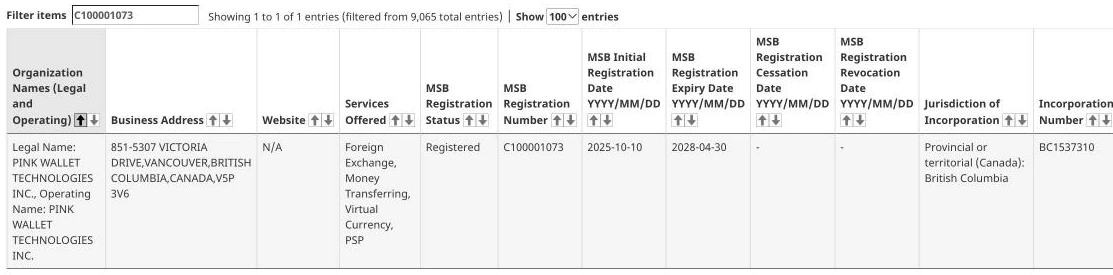
Pink Card is a PinkWallet product. Pink Card's user agreement does not currently name the operating company; the company and registration number are on PinkWallet's license disclosure page. PinkWallet's disclosure page gives its FINTRAC registration number as C100001073. Typing that number into the FINTRAC filter on 2026-11-28 left one record out of 9,065:
| Registry field | What it shows | OK? |
|---|---|---|
| Legal / operating name | PINK WALLET TECHNOLOGIES INC. | Number matches. The name is one letter off: the disclosure page and the App Store say Pink Wallet Technology Inc., the registry says TECHNOLOGIES. We go by the number and have asked the company to align the spelling |
| Status | Registered | Yes |
| Registration number | C100001073 | Matches the disclosure page |
| Initial registration date | 2025-10-10 | — |
| Expiry date | 2028-04-30 | Not expired |
| Cessation / revocation date | "-" for both | Not ceased, not revoked |
| Address / incorporation | Business address in Vancouver; incorporated in British Columbia (Jurisdiction of Incorporation column) | Both in Canada |
| Services offered | Foreign Exchange, Money Transferring, Virtual Currency, PSP | Covers cross-border payment settlement |
PinkWallet's disclosure page also lists a US FinCEN MSB registration, No. 31000321450011 (entity: Pink Technologies Inc), which you can check the same way on FinCEN's search page.
The disclosure page itself: PinkWallet global license disclosure
Three things to know before you rely on a lookup
- Registered is not the same as endorsed. FINTRAC states on the registry page that registration does not mean it endorses or licenses the business, only that the business met the legal requirements to register, and that it does not issue licenses or certificates of registration. A "FINTRAC license certificate" image should make you more suspicious, not less
- Registration is the minimum bar. It proves the company is real and known to the regulator; it says nothing about whether the card works at the merchants you need, whether refunds are written into the agreement, or whether support answers
- The registry is not live. FINTRAC says it is updated monthly, so a newly registered or renewed company may not show up yet; check again later rather than relying on a screenshot sent by the provider
What else to check besides registration
| Check | Why | Pink Card (as of 2026-11-28) |
|---|---|---|
| Refund rules in the agreement | A support agent's promise is not binding; the agreement is | Pink Card User Agreement, Section 11: full refund (card fee and service fee included) before the card details are emailed; if the card was never used, failed at two or more major AI merchants and the card is confirmed as the cause, a refund of the face value or a free replacement |
| Published success data | Getting the payment through is the point of buying the card | Over 99% success at 13 major AI merchant categories over the last 90 days, excluding cardholder-side causes such as insufficient balance or a mistyped expiry date; method and data on the research page |
| Reachable support | You need someone to answer when a charge goes wrong | 24/7 live chat, [email protected] |
| App store listings | The developer name on the listing is one more thing to compare with the operating company | iOS "PinkWallet: Bank Accounts" (US / Canadian App Store), developer Pink Wallet Technology Inc. (one letter off the registry name; see the worked example); Android "PinkCard" on Google Play, package cc.pinkcard.app |
Who runs Pink Card, refunds and success rates in detail: Is Pink Card legit?
Per-merchant success rates and decline reasons: Pink Card payment research: AI payment compatibility index
About Pink Card (disclosure: this is our product)
Pink Card is the overseas gift card built for AI subscriptions: a USD prepaid virtual card (Mastercard / Visa) from PinkWallet, run by a company incorporated in British Columbia and registered with FINTRAC as a money services business (C100001073). Pick an amount on pinkcard.cc, pay with Alipay, and the card number, expiry date and CVV arrive by email in about 1–2 minutes. It cannot be added to an Apple ID / App Store, so subscribe on the merchant's website; Google Play works.
- Card: $10 card fee plus 3% of (face value + $10); standard cards start at $50
- Paying in RMB (Alipay) adds 3%
- Monthly fee $2.50 and $1 per charge, both taken from the card balance
- Top-up: $5 plus 5% of (top-up amount + $5), usually on the card within 5–10 minutes, same card number
Buy a card: choose an amount on the Pink Card home page
Chinese version (中文版): 虚拟卡平台有没有牌照怎么查