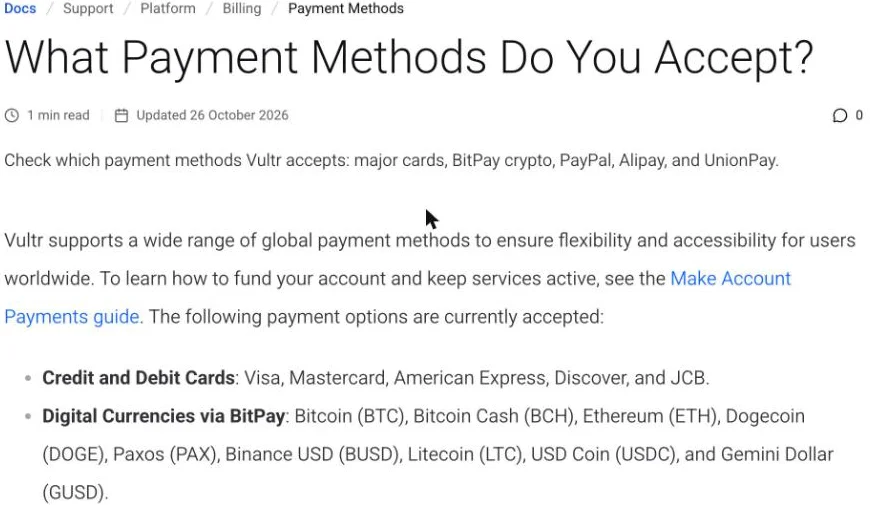
Short answer: check for a domestic-currency path first. Exam registrations, Steam's regional store, Uber's WeChat mini-program, Duolingo, and — somewhat surprisingly — the cloud server host Vultr all accept Alipay or UnionPay directly in mainland China; none of those need a USD card.
What genuinely needs a card that can bill in USD: web-only services with automatic monthly billing — X (Twitter) Premium, Patreon, Figma, Notion, YouTube Premium, Cloudflare — plus AI subscriptions like ChatGPT and Claude. Anyone who wants hands-off domain auto-renewal also needs either a card on file or a pre-funded account balance, since Alipay is a one-time payment method.
The table below gives each scenario's domestic-currency path (if any), whether a USD card is actually needed, and what we see on our own issued cards over a fresh 90-day read-only query (2026-08-28 to 2026-11-26 Beijing time, queried 2026-11-26). Most declines are simply not enough balance for that one charge, not the merchant refusing the card.
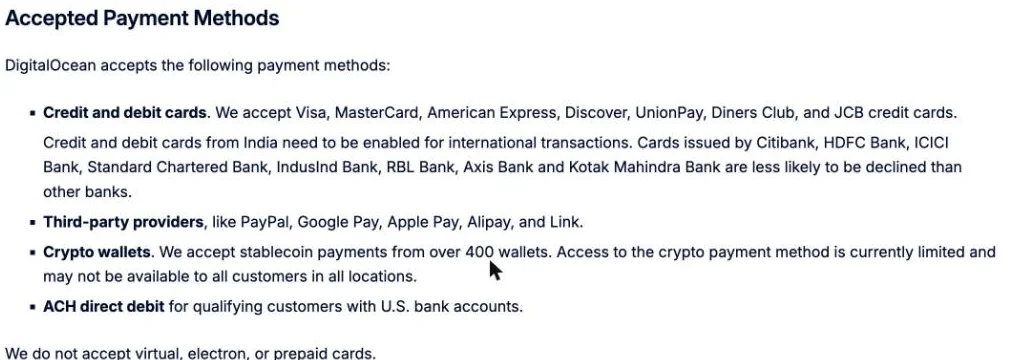
Written by the Pink Card team (pinkcard.cc). Payment-method claims are from each service's own help page or official announcement, checked 2026-11-26 Beijing time (see the linked per-topic guides for exact sources): Namecheap/NameSilo/Spaceship/GoDaddy knowledge bases, Vultr's "What Payment Methods Do You Accept" docs, DigitalOcean's "Accepted Payment Methods" docs, and the X, Cloudflare, Patreon and Netflix help centers. Card data is a read-only query, totals only, on cards Pink Card issued itself, excluding partner-channel and internal test cards. Pink Card has no official relationship with any service in this table.
The 18 scenarios
| Scenario | Domestic-currency path | Need a USD card? | On our cards (90 days) |
|---|---|---|---|
| IELTS/TOEFL/GRE registration (mainland China test centers) | Official registration sites: Alipay, UnionPay, etc. | Not needed | No record |
| GRE score reports / extra TOEFL score reports (direct from ETS) | ETS bills in USD by card or PayPal; TOEFL can also add score reports in CNY via the mainland registration site | Needed only if you don't have a USD card or PayPal | No record, not guaranteed to work |
| Duolingo English Test | Alipay accepted officially | Not needed | No record |
| Steam (regional store) | Alipay, WeChat Pay | Not needed | No record |
| Uber (overseas rides) | Uber's WeChat mini-program, WeChat Pay (since July 2025) | Mostly not needed | No record |
| Hotels (Agoda, Trip.com, etc.) | Trip.com/Ctrip can pay in CNY | Usually not needed; deposits at check-in don't suit a prepaid card | 3 successful, 14 declined (10 insufficient funds, 2 CVV/expiry mis-entered); 90-day refresh, previously lower |
| Travel eSIM (Airalo, etc.) | Airalo lists UnionPay; Alipay inside the app | Usually not needed | 1 successful ($6.00); sample is thin, varies a lot month to month |
| Cloud servers (Vultr, DigitalOcean) | Both list Alipay; DigitalOcean's own docs explicitly exclude prepaid/virtual cards | Not needed — and officially unsupported on DigitalOcean | Vultr: 5 successful, $1,870, 0 declined (2 still pending). DigitalOcean: 5 successful, $1,000 (same card as the Vultr successes), 2 declined (over a transaction limit, not card type) |
| Domains (GoDaddy, NameSilo, Spaceship, Namecheap) | First three take Alipay; Namecheap takes UnionPay | Not needed for a one-time purchase; auto-renewal needs a card on file or pre-funded balance | GoDaddy: 3 successful on 2 cards, $717.78. NameSilo: 2 successful, 1 declined (insufficient funds). Namecheap: no record |
| Cloudflare (Workers, Pro, domain renewal) | No Alipay or WeChat Pay; cards (incl. UnionPay) and PayPal | Needed if you have no other USD-billing method | 10 successful on 8 cards, $70.22; 1 declined (card blocked), 1 reversed |
| X (Twitter) Premium | X help center doesn't list Alipay/WeChat Pay; web checkout bills a card | Needed | 4 successful on 2 cards, $20.48; 1 declined (insufficient funds) |
| US Apple ID / App Store | Needs a US payment method | Pink Card cannot be added to an Apple ID; subscribe to ChatGPT/Claude etc. on the web instead | Not supported (in-app purchases and App Store subscriptions don't work with it) |
| Patreon (creator memberships) | No Alipay/WeChat Pay; cards and PayPal | Needed (or PayPal) | 11 successful on 9 cards, $382.48; 13 declined — a notably higher decline count than our last check, mostly balance-related |
| Netflix | Cards (incl. a recurring-capable prepaid card), PayPal, gift cards | Needed if you have no other USD-billing method | 3 successful on 2 cards, $49.30, 0 declined |
| YouTube Premium | Added as a payment method in Google Payments | Needed | 1 successful, 18 declined (13 insufficient funds, 5 on a card that had already been closed while the subscription kept billing it) |
| Notion | Web checkout bills a card | Needed | 2 successful on 2 cards, $30.00, 0 declined |
| Figma | Official page does not list Alipay/WeChat Pay | Needed | 5 successful on 4 cards, $108.78; 2 declined, both insufficient funds |
| ChatGPT, Claude, Gemini, etc. | Web subscriptions mostly bill a card only (Grok accepts Alipay for some accounts) | Needed | Our highest-volume use case — see the AI-subscription payment comparison guide linked below |
Ask yourself 3 questions before getting a USD card
- Does it have a domestic-currency path — a China-facing site, a WeChat mini-program, or Alipay/UnionPay at checkout? If yes, use that, it is cheaper.
- Is it auto-billed monthly? A subscription that renews on its own needs a card kept on file; Alipay's one-time payment generally cannot be set up for recurring billing.
- Does the merchant actually accept a prepaid card? DigitalOcean's own docs say no; hotels and car rentals commonly hold a deposit, which also does not suit a prepaid balance. Namecheap and Netflix explicitly state they accept prepaid and virtual cards.
If you were declined, check these first
- A locally issued card without overseas transactions enabled gets declined outright by the issuer — switch to one that has it enabled, or use a domestic-currency path where one exists.
- Not enough balance for that one charge: most declines in the table above are this. Checkout totals are often higher than list price once tax and currency conversion are applied — load "the checkout total + $1", not the sticker price.
- A closed card still being billed: the YouTube Premium row above is mostly this — switch cards or cancel in the platform before retiring a card.
- CVV or expiry mistyped: use exactly what is on the card-issuance email, and do not retry repeatedly — each failed attempt can also count against risk checks.
- Officially excluded card type: DigitalOcean's docs say no, though on our own cards the exact same card that succeeds at Vultr also succeeded 5 times at DigitalOcean in this window — official wording and real-world outcomes do not always match, so neither "it will definitely work" nor "it will definitely fail" is safe to assume; test small.
How declines stack up and what to check in order: A card declined again and again — what to check
If you need a USD card: Pink Card (disclosure)
Disclosure: Pink Card is the overseas gift card we make, built for AI subscriptions — a prepaid USD virtual card (Mastercard / Visa) that also works for the "needed" rows in the table above. Honestly: for every "not needed" row, Alipay or UnionPay is cheaper — do not get a card just for those. Choose an amount on pinkcard.cc, pay by Alipay QR code, and the card number, expiry and CVV arrive by email about 1–2 minutes later. Pink Card is a payment tool; it does not change any service's own region or account rules, and nothing here is guaranteed to work on every card or every charge.
- Issuance: $10 one-time plus 3% service fee on (card amount + $10). Web checkout presets start at $50 (custom amounts from $50).
- A 3% channel fee applies on top when paying in CNY via Alipay.
- $2.50 monthly fee from the balance.
- A $1 fee applies per transaction, including declined ones (at most 3 per card per month).
- Top-up: $5 plus 5% on (top-up amount + $5), minimum $30, usually credited within 5–10 minutes; the card number stays the same.
Buy a card: choose an amount on the Pink Card home page
Already have one: enter the card number and lookup code to see transactions and top up
Domain registrars in detail — Namecheap, NameSilo, Spaceship, and what happens when auto-renewal declines: How to pay for an overseas domain
Comparing how ChatGPT, Gemini, Grok, Cursor, Devin and Claude each bill a card: Paying ChatGPT, Gemini, Grok, Cursor, Devin and Claude by card compared
Once the card details are emailed, the order cannot be cancelled, so double-check your email address before paying.
Chinese version (中文版,付款方式按中文站): 海外网站付款被拒怎么办