Short answer: when ChatGPT says “Your card has insufficient funds”, the card does not have enough available money for this one charge. ChatGPT web subscriptions are collected through Stripe, where the matching decline code is insufficient_funds and the suggested fix is to use another payment method. With a prepaid card, adding enough money is all it takes.
How much to add: go by what the card will actually be charged, not the list price. Plus is $20 before tax, and taxed charges on our cards are usually $21.20–$21.82; Pro starts at $100 or $200; charges in Philippine pesos, Taiwan dollars or yen move with the exchange rate. Keep at least “this charge + $1” on the card, top up, wait until the money lands (usually within 5–10 minutes), then pay once.
What we see on our cards: between 2026-08-25 and 2026-11-23 (Beijing time), ChatGPT web subscriptions were declined 375 times, and 305 of those (81%) were for not enough money for that charge. Almost every one that later went through was topped up first. Switching browsers, re-adding the card or waiting for ChatGPT to retry does nothing while the money is not on the card.
Written by the Pink Card team (pinkcard.cc). OpenAI’s and Stripe’s wording comes from the OpenAI Help Center article “Why was my credit card declined?” (help.openai.com 7232916) and Stripe’s “Decline codes” page (docs.stripe.com/declines/codes), opened without signing in and captured on 2026-11-23 (Beijing time). Card data is a read-only query run on the morning of 2026-11-23 (Beijing time) covering 2026-08-25 00:00 to 2026-11-23 00:00 Beijing time, merchants OPENAI *CHATGPT SUBSCR / OPENAI* CHATGPT SUBSCR (chatgpt.com web subscriptions including Go, Plus, Pro and upgrade charges; not app-store purchases, credits or the API), on cards Pink Card issued itself, excluding partner-channel and internal test cards; totals only. Pink Card has no official relationship with OpenAI or Stripe.
What OpenAI and Stripe say
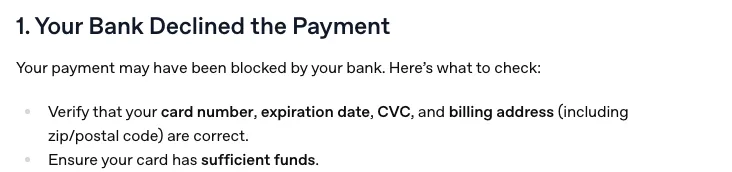
The first section of the OpenAI Help Center article “Why was my credit card declined?”, “Your Bank Declined the Payment”, lists what to check: the card number, expiry date, CVC and billing address (including the postal code) are correct, and the card has sufficient funds. The same article notes that OpenAI usually does not receive the specific reason from the bank, so the page may only say “Your card was declined” or “Payment was not approved” instead of “insufficient funds”.
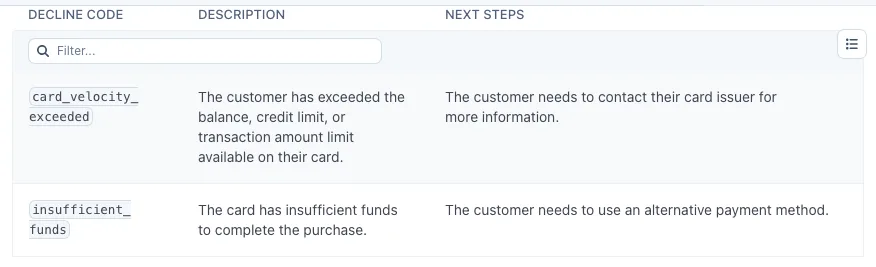
Stripe’s decline-code table has two codes about money: insufficient_funds (the card has insufficient funds to complete the purchase; ask the customer to use another payment method) and card_velocity_exceeded (the customer has exceeded the balance, credit limit or transaction amount limit on the card; contact the card issuer). On a prepaid card, both mean the same thing: this charge is bigger than what the card can spend.
375 ChatGPT declines on our cards in 90 days
| Reason in the card’s transaction history | Declines | Cards |
|---|---|---|
| You have exceeded the cumulative amount limit for this card (part of the card was already spent; what is left is not enough) | 197 | 42 |
| The value is greater than the maximum single transaction value (this charge is more than the money left) | 76 | 25 |
| You have exceeded the monthly transaction amount limit (a large charge above what the card can spend) | 32 | 5 |
| Subtotal: not enough money for this charge | 305 (81%) | 64 |
| Blocked (the card was closed; the subscription still bills the old card) | 57 | 42 |
| Card expiry check failed / ExpiryFailCount (wrong expiry date entered) | 13 | 3 |
- Amounts: of the 305, 139 were under $25 (mostly Plus), 48 were $25–$90, 65 were $90–$150 and 53 were $150 or more. The most common amounts were $20.00 (76), $100 (38) and $200 (16).
- Currencies: 202 in USD, 58 in Philippine pesos (6 cards), 15 in Taiwan dollars, 11 in yen, 10 in Singapore dollars, 6 in pounds and a few others. The same TWD 690 converted to anywhere between $21.31 and $21.73 on one card.
- Counting each run of declines between two successful charges on the same card as one streak, there were 73 streaks: 36 at the Plus level (under $40), 26 at $70–$130 and 11 above $130. 39 happened after the card had already paid ChatGPT (a renewal or an upgrade); 34 had no earlier success in the window.
- 24 of the 73 streaks ended in a successful charge within 30 days, and 23 of those had a top-up in between; from the top-up landing to the successful charge took a median of about 15 minutes. The other 49 streaks (204 declines) never succeeded again.
- 80 declines came within the same minute as another decline on the same card: repeated clicking, or paying right after ordering a top-up before the money had landed.
After a failed renewal, how often ChatGPT tries again
This is what we observe on our cards, not a published OpenAI rule: after a renewal is declined, ChatGPT retries on its own. The median gap between retries was about 29 hours, and half fell between roughly 20 hours and 3 days. One Plus card was charged $20 once a day from 09-12 to 09-18, declined 7 days in a row; one Pro card was tried 5 times for $100 between 11-17 and 11-22. Each decline also costs $1 on our card (at most 3 declined-charge fees per card per month).
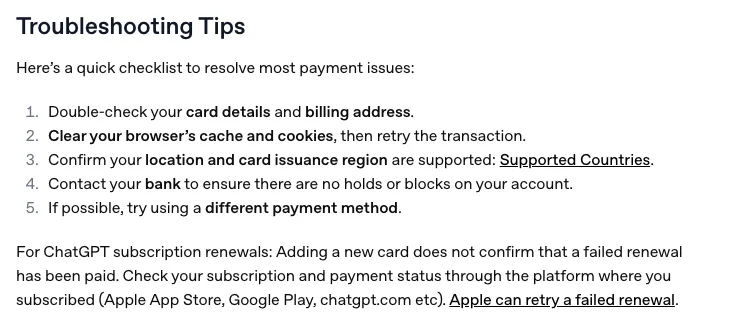
The same OpenAI article spells it out: for ChatGPT subscription renewals, adding a new card does not confirm that a failed renewal has been paid. Check the subscription and payment status where you subscribed (chatgpt.com, the App Store or Google Play).
Insufficient funds: what to do, in order
- Stop clicking. While the money is short every attempt is declined, and each one costs another $1.
- Check the reason: look up the card’s transaction history with the card number and lookup code. “cumulative amount limit”, “maximum single transaction value” or “monthly transaction amount limit” all mean not enough money. If the attempt is not on the card at all, it was stopped on OpenAI’s side and a top-up will not help — see the “Payment was not approved” link below.
- Work out the amount: use the tax-inclusive amount shown on ChatGPT’s payment page; for foreign-currency charges, keep an extra 3%–5% for the exchange rate.
- Top up to at least “this charge + $1”, and keep $2.50 for the monthly fee at the start of the month. A top-up usually lands within 5–10 minutes; the card number stays the same, so there is no need to re-add the card in ChatGPT.
- Pay once after the money lands: when the card page shows the new balance, pay from Settings → Account on chatgpt.com (or the link in the failed-payment notice) — one click.
- Confirm the status: check in Settings that the subscription is active again; “card added” alone does not mean the charge was paid.
- If you re-enter the card: use the cardholder name exactly as in the card email, and a billing address in the same place your internet connection exits, down to the city.
How much to keep on the card for Plus and Pro
| Plan | Typical actual charge on our cards | Keep at least |
|---|---|---|
| Plus ($20/month) | $20.00; with tax $21.20–$21.82; peso, Taiwan dollar and yen charges vary | $25 |
| Pro 100 ($100/month) | From $100; seen with tax at $108.43 and $108.88 | $115 |
| Pro 200 ($200/month) | From $200; varies with tax or foreign currency | $225 |
| Mid-cycle upgrade (Plus → Pro) | Prorated difference charged at once; we have seen $84.06 | Amount on the payment page + $1 |
A common trap: the prorated charge for upgrading to Pro is far bigger than a monthly Plus charge. One card on our side paid Plus at $20 on 09-06; on 09-12 the upgrade asked for $84.06. The user started paying before the top-up had landed and was declined 20 times in 25 minutes; at 18:32 $84.07 went through.
Paying ChatGPT with Pink Card (disclosure: this is our product)
Pink Card, from PinkWallet, is the overseas gift card built for AI subscriptions: a prepaid USD virtual card (Mastercard / Visa) you can add on chatgpt.com. It has no official relationship with OpenAI, and it is only a way to pay — it does not guarantee every charge will go through. When the balance runs low, top up the same card; the card number does not change.
- Choose an amount on pinkcard.cc/en: presets start at $50 ($50, $110, $220, $500, $1000), or enter a custom amount from $50.
- Pay with USDT on BEP-20 or ERC-20, or USDC on ERC-20. The card number, expiry and CVV arrive by email about 1–2 minutes after the payment confirms.
- Card issuance: $10 one-time, plus a 3% service fee on (card amount + $10). A $50 card costs $61.80, a $110 card $123.60.
- From the card balance: $1 per transaction (declined ones too, at most 3 declined charges per card per month) and $2.50 per month.
- Top-up on the same card: $5 plus 5% of (top-up amount + $5), minimum $30 ($30 → $36.75, $110 → $120.75), usually on the card within 5–10 minutes.
- Once the card details are emailed, the order cannot be cancelled, so double-check your email address before paying.
Buy a card: choose an amount on the Pink Card home page
Already have a Pink Card? Enter the card number and lookup code to see transactions and top up
Adding the card in ChatGPT, step by step: How to use Pink Card with ChatGPT
What the card’s decline messages mean: Prepaid virtual card decline messages explained
Renewal failed and want the full picture: ChatGPT Plus renewal failed
What you pay on the day you upgrade to Pro: Upgrading ChatGPT Plus to Pro mid-cycle
Why ChatGPT charged in Philippine pesos: ChatGPT charged in Philippine pesos (PHP)
How long a top-up takes to land: How long a prepaid virtual card top-up takes
Chinese version (中文版,付款方式按中文站): ChatGPT 提示 Your card has insufficient funds 怎么办