How to pay for the xAI (Grok) API: sign in at console.x.ai, open Billing → API spend management and click Purchase credits. You pay by card (xAI also mentions bank transfer, which takes 2–3 business days), and every API call is deducted from that prepaid balance. When the balance hits zero, requests are rejected.
Grok subscriptions are a separate bill. xAI’s FAQ says the same account works for Grok and the API, but billing is separate: a SuperGrok or X Subscription plan on grok.com does not include API usage, so API credits are always bought on console.x.ai.
On cards we issued, the charge shows as GROK XAI PALO ALTO. In the 91 days to 2026-11-12 (UTC) there were 166 successful GROK XAI charges on 101 cards; 54 of them on 33 cards were round amounts typical of API credits ($5, $10, $20, $50). Most declines were a card holding less than the charge, not xAI refusing the card.
Need a card that works on console.x.ai? Pay with USDT (BEP-20 has the lowest fee), USDC or Alipay, card ready in 1–2 minutes: get a Pink Card
Written by the Pink Card team (pinkcard.cc). xAI rules are from the xAI docs pages “Manage Billing”, “FAQ – Billing”, “FAQ – Accounts”, “Rate Limits” and “Pricing”, opened without signing in on 2026-11-13 (Beijing time); the docs now name the company SpaceXSI, we call it xAI below. They may change, so your console wins. Card data is from our own transaction records with no customer details. Pink Card is not affiliated with xAI.
How to buy xAI API credits on console.x.ai
- Sign in at console.x.ai with your xAI account (the same account as grok.com; create one if you have none).
- Make sure the right team is selected. xAI warns that billing settings apply to the whole team.
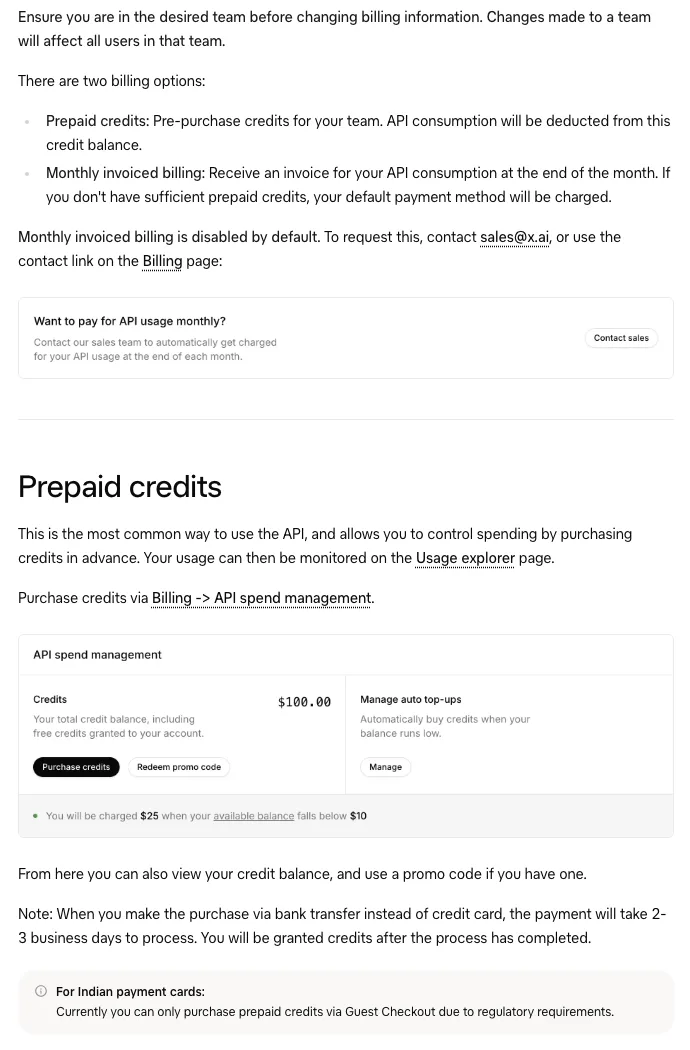
- Open Billing → API spend management, click Purchase credits and enter the amount.
- Enter the card number, expiry, CVC and billing address. The address is printed on the invoice and xAI says it cannot regenerate invoices, so get it right the first time.
- Check the Credits balance on API spend management before buying again.
- Create an API key and start calling the API. Usage shows on the Usage explorer page.
- The card you pay with is saved automatically for the next purchase. xAI says you cannot remove the last payment method on file.
- Indian-issued cards cannot be saved for later charges (regulatory requirement); buy credits through Guest Checkout each time.
- Bank transfer purchases take 2–3 business days; credits are added after the payment clears.
- Monthly invoiced billing is disabled by default; you request it from [email protected]. Most individual developers use prepaid credits.
- Promo codes are redeemed in the same place (Redeem promo code).
Auto top-up: minimum $5, at most 5 per 24 hours
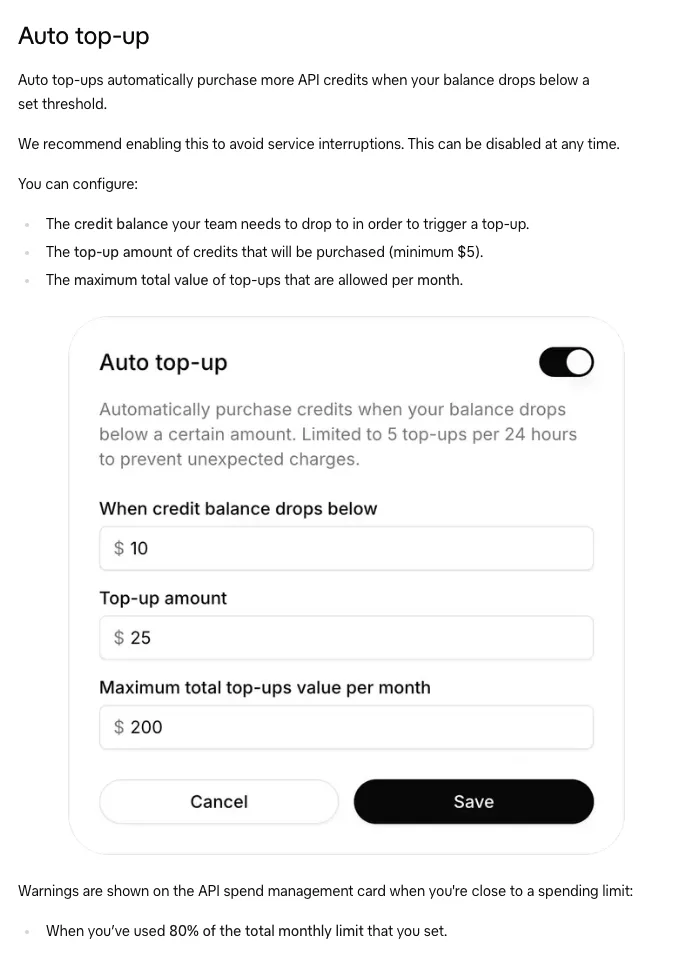
- Under Manage auto top-ups you set the balance that triggers a top-up, the amount bought each time (minimum $5) and a maximum total per month.
- Automatic top-ups are limited to 5 per 24 hours “to prevent unexpected charges”.
- A warning appears on the API spend management card at 80% of your monthly limit.
- xAI recommends turning it on to avoid interruptions; you can turn it off any time.
- On a prepaid card, every automatic top-up is a separate card charge. If the card is short, the top-up is declined and API requests stop once the credits run out, so keep enough on the card for the top-up amount plus any per-transaction fee.
What the Grok API costs and whether credits are refundable
| Model | Input / 1M tokens | Cached input / 1M tokens | Output / 1M tokens |
|---|---|---|---|
| grok-4.7 (prompt under 200k tokens) | $2.00 | $0.50 | $6.00 |
| grok-4.3 (prompt under 200k tokens) | $1.25 | $0.20 | $2.50 |
| grok-build-0.1 (prompt under 200k tokens) | $1.00 | $0.20 | $2.00 |
- When you are charged: the card is charged when you buy credits; API usage is calculated per request and deducted from the credits.
- Refunds: xAI’s billing FAQ says prepaid API credits are not refundable “unless in regions required by law”. Buy roughly what you expect to use.
- Running out: the default invoiced billing limit is $0, so once prepaid credits are gone, API requests are rejected automatically.
- The pages we checked do not state an expiry date for prepaid credits; check your console.
Rate limits go up with cumulative spend
- Each team has per-model limits on requests per second and tokens per minute. Going over returns 429 Too Many Requests, which is not a payment problem.
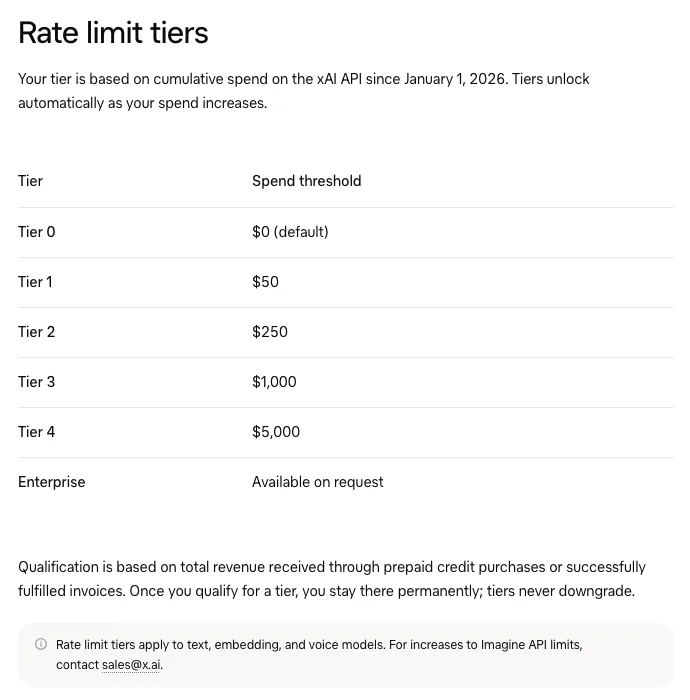
- Tiers by cumulative spend since 2026-01-01: $50 for Tier 1, $250 for Tier 2, $1,000 for Tier 3, $5,000 for Tier 4.
- Several small purchases count the same as one large one, so there is no need to buy a big block just to move up a tier.
- Your tier and limits are on the Models page in the console, where you can also request an increase.
Why an xAI credit purchase is declined, and what to check
- Check that xAI supports your region and that you accept its terms, and that you are paying for the right team.
- Work out the full charge: the card must hold the credit amount plus any per-transaction card fee. On our cards, too little balance was by far the most common cause.
- Check card number, expiry and CVC exactly. 4 of the declines on our cards were a wrong CVC (“CVV2 Code Mismatch”).
- Use the billing address the issuer has on file, in the same city as your network exit.
- If auto top-up is on, see whether it is the automatic top-up being declined again and again (at least $5 each, up to 5 per 24 hours).
- Do not retry in a loop. Check Billing for a purchase that already went through, then pay once.
What we saw on our cards: GROK XAI charges in 91 days
Every charge from merchant GROK XAI PALO ALTO on cards we issued, 2026-08-14 00:00 to 2026-11-13 00:00 UTC, with no customer details. API credits and grok.com subscriptions use the same merchant name, so the card record cannot tell them apart; we grouped them by amount, since subscriptions have fixed prices and API credits are an amount you type.
| Amount | Most likely | Successful | Declined |
|---|---|---|---|
| Round USD, not a plan price ($5, $10, $20, $25, $50 …) | API credits | 54 on 33 cards, $1,284 | 68 on 21 cards |
| $8, $15, $30, $300 | Plan prices (e.g. Plus $8, Premium $30, Premium first month $15) | 47 on 45 cards, $951 | 21 on 4 cards |
| $100 | Super plan or $100 of API credits; cannot tell | 10 on 5 cards, $1,000 | 6 on 1 card |
| USD with cents (e.g. $16.33, $32.66) | Plan price plus tax | 20 on 19 cards, $635.22 | 7 on 3 cards |
| HKD, JPY, CNY and other currencies | Plans priced in local currency | 35 on 25 cards, $882.84 billed | 19 on 4 cards |
- Of the 54 API-sized successful charges: 28 were $10 or less ($5 was the most common, 21 times), 10 were $10–25, 15 were $25–100 (12 of them $50) and 1 was over $100.
- Of the 68 declines in that group, 61 were limit messages (cumulative 18, monthly 16, over the single-transaction maximum 14, daily 13), which on our cards means the card held less than the charge; 4 were a wrong CVC, 2 a locked card, 1 an expiry check.
- Declines cluster on a few cards: one card had 14. 14 of the 21 cards with a declined API-sized charge also had a successful one in the same 91 days, i.e. they paid once the balance was enough.
- 15 of the 33 cards that bought API-sized amounts also paid plan-sized amounts: people who subscribe to Grok and buy API credits on the same card.
- We found no “prepaid cards not accepted” rule in the xAI docs we checked, but successful charges on our cards do not guarantee every card and every charge will pass.
Buy xAI API credits with a prepaid virtual card
- Open pinkcard.cc/en and choose an amount: presets start at $50 ($50, $110, $220, $500, $1000), or enter a custom amount from $50.
- Pay with USDT on BEP-20 (shown as BSC or BNB Smart Chain on most exchanges; lowest network fee) or ERC-20, with USDC on ERC-20, or with Alipay (needs a mainland China Alipay account). Send exactly the amount shown, on exactly the network you picked.
- Enter your email twice. No account and no sign-up are needed.
- The card number, expiry and CVV arrive by email about 1–2 minutes after the payment confirms (check spam).
- On console.x.ai open Billing → API spend management → Purchase credits, pay with the card from the email and a billing address in the same city as your network exit, and submit once.
- Top up the same card when it runs low. The number does not change, so the card saved on console.x.ai keeps working; card top-ups usually arrive within 5–10 minutes.
Pink Card fees (as of 2026-11-13)
- Card issuance: $10 one-time, plus a 3% service fee on (card amount + $10). A $50 card costs $61.80 in total.
- From the card balance after activation: $1 per transaction and $2.50 per month.
- Failed authorizations are charged $1 too (at most 3 failed charges per card per month), so do not retry a declined purchase in a loop.
- Top-up of the same card: $5 plus 5% of (top-up amount + $5), minimum $30, usually on the card within 5–10 minutes. Full fee table: pinkcard.cc/en/fees.
- Once the card details are emailed, the order cannot be cancelled, so double-check your email address before paying.
Ready to get a card? Pick an amount on the Pink Card purchase page
Screenshots of adding the card on grok.com and console.x.ai: Use your Pink Card on Grok and the xAI API
Subscribing to Grok itself (Plus $8, Premium $30, Super $100, Ultra $200)? See: Grok is now The X Subscription: prices, payment and declines
On the old SuperGrok plan, or paying through the App Store / Google Play? See: SuperGrok payment and declined fixes
A Grok subscription renewal was declined? See: Grok renewal payment failed
Paying OpenAI or Anthropic API credits too? See: Pay OpenAI and Anthropic API credits with USDT or USDC
Topping up DeepSeek as well? See: DeepSeek API top-up: payment methods, the extra 6% and card declined fixes
Calling Grok and other models through OpenRouter instead? See: OpenRouter payment methods and card declined fixes
Chinese version (中文版,付款方式按中文站): xAI / Grok API 怎么付款